While many key fobs use easily removable batteries, if you drive an older model, you might encounter one of the most common problems: the remote key's battery won't charge. Earlier automotive remote keys use a battery that is physically soldered to the circuit board. That means the job requires careful desoldering, unlike regular household batteries which can be easily removed and replaced.
Before replacing the battery, please confirm that the problem is with the battery, such as weak signal, intermittent functionality, dim or unlit key fobindicator lights, dashboard warnings about a low key fob battery, etc. if you notice these, it’s time to act, if these batteries dies completely, the key may stop charging entirely.
Soldering might sound intimidating, but beginner-friendly kits make it accessible. Gather these items before starting: 
Soldering iron kit: Opt for a 20-60W adjustable model. Look for kits that include solder wire, a stand, and a sponge.
Battery: Check your car’s owner’s manual or the old battery for the correct type.
Small screwdrivers: A precision flathead and Phillips head set.
Plastic pry tool: Prevents scratching the fob’s plastic case.
Desoldering pump or wick: Essential for removing old solder from the circuit board.
Heat-resistant mat: Protects your workspace from the hot soldering iron.
Rubbing alcohol & cotton swabs: For cleaning dirty battery contacts.
Tweezers: Helps handle the tiny battery and hold components steady.
How To Replace a Key Fob Battery?
Step 1: Open the Key Fob Case.
Remove the mechanical key and open the fob case.
Step 2: Access the Circuit Board.
Once the case is open, you’ll see the circuit board inside. Carefully lift it out.
Step 3: Remove the Old Battery (Desoldering).
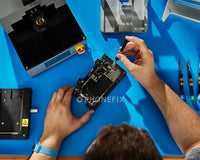
The battery will be soldered to two metal terminals on the circuit board. Touch the hot soldering iron to the joint to melt the solder. After the solder melts, clean it with desoldering wire, and then use tweezers to remove the old battery from the circuit board.
Step 4: Prep the Circuit Board & Install the New Battery.
Use rubbing alcohol to clean the battery terminals on the circuit board, this removes corrosion or old solder residue. And place the new battery on the terminals, holding it steady with tweezers.
Step 5: Solder the New Battery in Place.
Touch the soldering iron to one terminal for 1-2 seconds to heat it. Touch the end of the solder wire to the terminal. The solder will melt and flow around the terminal, securing the battery. Repeat for the second terminal. Let the solder cool for 1-2 minutes before moving the board.
Step 6: Reassemble & Test the Key Fob.
Place the circuit board back into the fob case, making sure it fits snugly. Close the outer shell, Test the fob. If it works, congratulations on your successful replacement. If not, check the battery orientation and solder joints.
If you’re uncomfortable with soldering, or if the circuit board looks burned or damaged, it’s best to visit a locksmith or dealership. They possess the experience and tools to handle complex remote keys.
To avoid frequent replacements, don’t carry the fob with other electronics that cause interference; Avoid pressing the buttons unnecessarily; Store the fob in a cool, dry place, extreme heat drains batteries quickly.
Replacing a soldered key fob battery is a great way to build your DIY skills and save money. With the right tools, you’ll have your fob working like new in no time. ECUFIXTool offers a range of tools; you can visit their store if you need them.
How to Replace Car Soldered Key Fob Battery